
🛠 Claude Skills - Hands-On: Build a Stock Analyzer Expert with Claude Skills
In general, a Claude agent can do many things — but if you want it to be truly expert in a specific domain, **Claude Skills** is the answer. Skills are more organized, easier to execute, and produce more consistent results than open-ended prompting.
A practical, step-by-step workshop
📖 Read the intro first: Claude Skills — Introduction & Overview
Table of Contents
- What We’re Building
- What the Skill Must Achieve
- How Claude Achieves Goals Using Skills
- The Skill Package Layout
- SKILL.md — Where Everything Starts
- helper-script.py — All Functions in One Place
- Installing the Skill in Claude Code
- Run It — Analyze TESLA Stock
1. 🎯 What We’re Building
In general, a Claude agent can do many things — but if you want it to be truly expert in a specific domain, Claude Skills is the answer. Skills are more organized, easier to execute, and produce more consistent results than open-ended prompting.
In this workshop we create a real, working Stock Analyzer Skill — a Claude agent that:
- Fetches live market data from Yahoo Finance
- Computes professional technical indicators
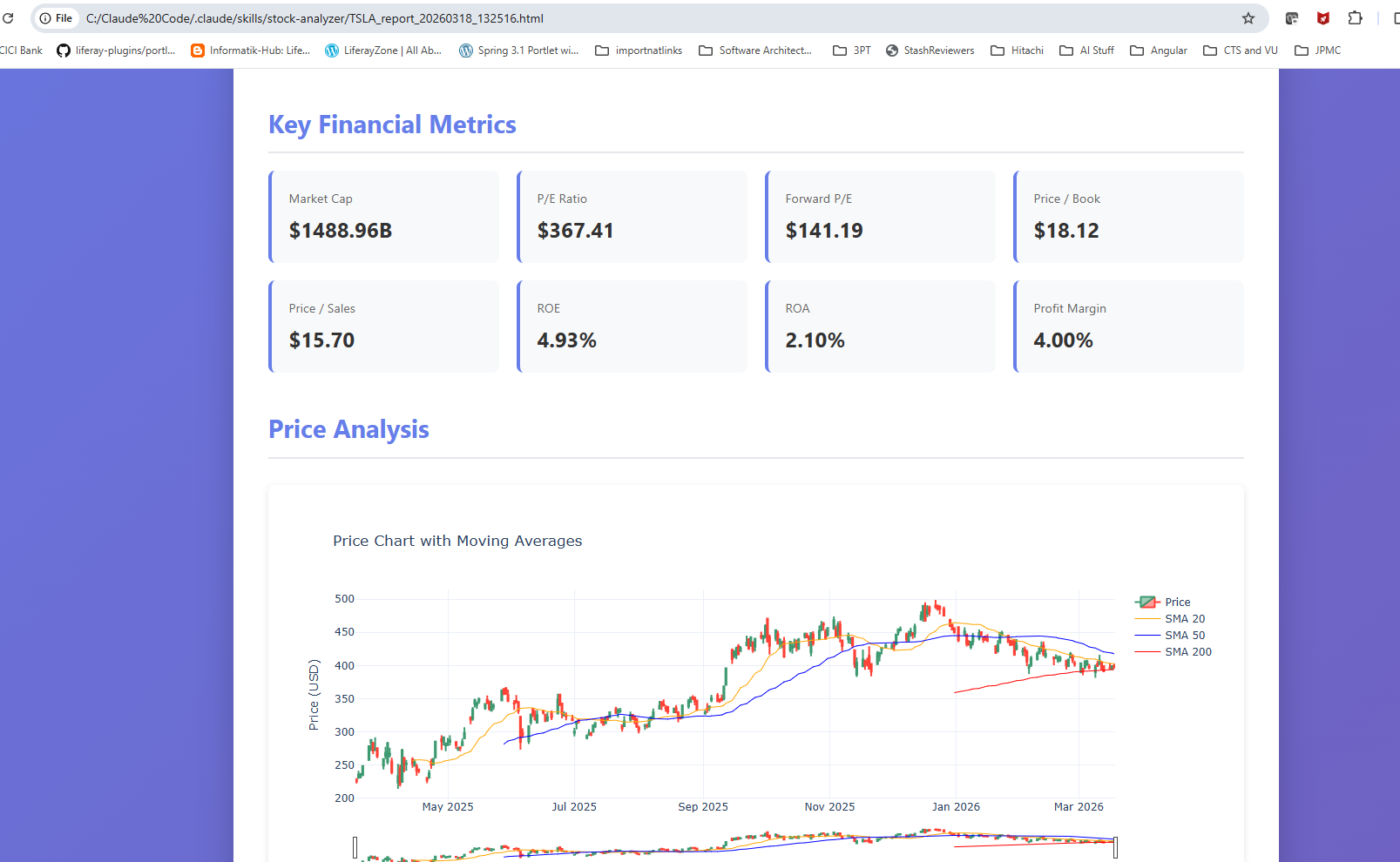
- Generates a comprehensive interactive HTML report
All triggered by a single natural-language query.
💡 Skills make Claude deterministic. Instead of reasoning from scratch every time, Claude follows your pre-tested scripts and produces the same high-quality output on every run.
2. 🏆 What the Skill Must Achieve
Our Stock Analyzer Skill has three concrete, measurable goals. Everything we build serves one of these.
| # | Goal | Description |
|---|---|---|
| 📥 01 | Fetch Historical Data | Read real OHLCV price data from the Yahoo Finance API for any stock ticker and time period |
| 📊 02 | Technical Analysis | Compute RSI, MACD, Bollinger Bands, SMA 20/50/200, EMA 12/26 — automatically on every run |
| 📄 03 | Generate Report | Produce a professional HTML report with interactive Plotly charts and fundamental metrics |
3. ⚙️ How Claude Achieves Goals Using Skills
Every Claude Skill’s instructions must be defined in a SKILL.md file — the brain of the skill. This is where you define the goal and point to the required scripts, helpers, and references so Claude knows exactly what to do.
💬 1. User sends a natural query
        "Analyze TESLA stock using stock-analyzer"
                    ↓
🔍 2. Claude matches query to the Skill
        Scans name + description in SKILL.md
                    ↓
🧠 3. Claude reads SKILL.md and follows instructions
        Loads full instructions into context
        Knows which scripts, templates, references to use
                    ↓
🐍 4. helper-script.py executes
        Fetches data → computes indicators → renders report
                    ↓
✅ 5. Output delivered
        HTML report saved · key findings summarized in terminal
4. 📁 The Skill Package Layout
The skill is a folder. Claude Code discovers it inside .claude/skills/ in your working directory.
claude-workspace/              ← open terminal from here
└── .claude/                   ← Claude Code config folder
    └── skills/                ← all skill packages live here
        └── stock-analyzer/    ← your skill package
            ├── SKILL.md       ← brain of the skill (required)
            ├── helper-script.py  ← analysis + report functions
            ├── templates/     ← report.html, email.txt
            └── resources/     ← reference-data.json
What each file does
| File | Role | Description |
|---|---|---|
📋 SKILL.md |
Brain · Required | YAML metadata for discovery + full instructions for execution |
🐍 helper-script.py |
Core Engine | All functions: analyze_stock(), generate_report(), generate_email(), all indicator calculations |
📁 templates/ |
Output Blueprints | report.html with `` · email.txt summary template |
📁 resources/ |
Reference Data | reference-data.json — RSI thresholds, sector P/E benchmarks, metric definitions |
5. 🧠 SKILL.md — Where Everything Starts
SKILL.md has two parts:
- YAML frontmatter — lightweight metadata Claude always reads (always in memory)
- Full instruction body — loaded only when the skill triggers
---
name: stock-analyzer
description: Comprehensive stock market analysis using Yahoo Finance data.
  Use this skill when users request stock analysis, historical price
  data, financial metrics, technical indicators, or investment reports
  for any stock symbol. Triggers include "analyze AAPL stock",
  "get Tesla financial data for last 6 months", "create stock report
  for MSFT", "compare NVDA performance over 1 year", or any mention
  of stock tickers with time periods. Generates detailed HTML reports
  with interactive charts, technical analysis, and fundamental metrics.
---

# Full instructions below — loaded when skill triggers
# Tells Claude: which script to run, what outputs to generate,
# which templates/resources to use, and how to interpret results.
✦ Write the description like a trigger condition. Include real example phrases users would actually say. Claude matches these patterns to decide whether to fire the skill.
| Field | Limit | Purpose |
|---|---|---|
name |
64 chars | Unique identifier Claude sees during discovery |
description |
1,024 chars | The trigger condition — make every word count |
| Full instructions | < 5k tokens | The detailed playbook for Claude |
| Linked files | On-demand | Scripts, templates, data loaded only if needed |
6. 🐍 helper-script.py — All Functions in One Place
helper-script.py is the single Python file that does all the heavy lifting. It contains every function the skill needs — pre-tested and production-ready.
Core Functions
| Function | What it does |
|---|---|
📥 analyze_stock(symbol, period) |
Fetches Yahoo Finance data + computes all indicators. Returns a rich dict. |
📊 calculate_rsi(data, period=14) |
14-period RSI — overbought >70, oversold <30 |
📈 calculate_macd(data) |
MACD line, signal line, histogram (12/26/9) |
〰️ calculate_bollinger_bands(data) |
Upper/mid/lower bands (20-period, ±2 std dev) |
📄 generate_report(data, path) |
Loads report.html, fills ``, writes self-contained HTML |
✉️ generate_email(data, recipient) |
Renders email.txt template, returns formatted string |
RSI Calculation
def calculate_rsi(data, period=14):
    """Relative Strength Index (default 14-period)."""
    delta = data['Close'].diff()
    gain  = (delta.where(delta > 0, 0)).rolling(window=period).mean()
    loss  = (-delta.where(delta < 0, 0)).rolling(window=period).mean()
    rs    = gain / loss
    return 100 - (100 / (1 + rs))   # overbought >70 · oversold <30
Stock Analysis — What Gets Returned
def analyze_stock(symbol, period='1y'):
    stock = yf.Ticker(symbol)
    hist  = stock.history(period=period)

    # Technical indicators computed automatically
    hist['SMA_20']  = calculate_sma(hist, 20)
    hist['SMA_50']  = calculate_sma(hist, 50)
    hist['SMA_200'] = calculate_sma(hist, 200)
    hist['RSI']     = calculate_rsi(hist)

    macd, signal, hist_vals = calculate_macd(hist)
    upper, mid, lower       = calculate_bollinger_bands(hist)

    # Returns full analysis dict
    return {
        'company_info':         ...,  # name, sector, employees, summary
        'current_price':        ...,  # price, change, change_percent
        'key_metrics':          ...,  # PE, PB, ROE, margins, debt/equity
        'technical_indicators': ...,  # RSI, MACD, SMA50/200, BB bands
        'performance':          ...,  # period_return, volatility, max/min
        'analyst_info':         ...,  # recommendation, target prices
    }
CLI Usage — Run Directly for Quick Testing
# Print console summary
python helper-script.py --symbol TSLA --period 6mo

# Generate interactive HTML report
python helper-script.py --symbol AAPL --period 1y --report

# Save raw analysis as JSON
python helper-script.py --symbol MSFT --period 2y --output msft.json

# Print rendered email summary
python helper-script.py --symbol NVDA --period 1y --email
7. 🔧 Installing the Skill in Claude Code
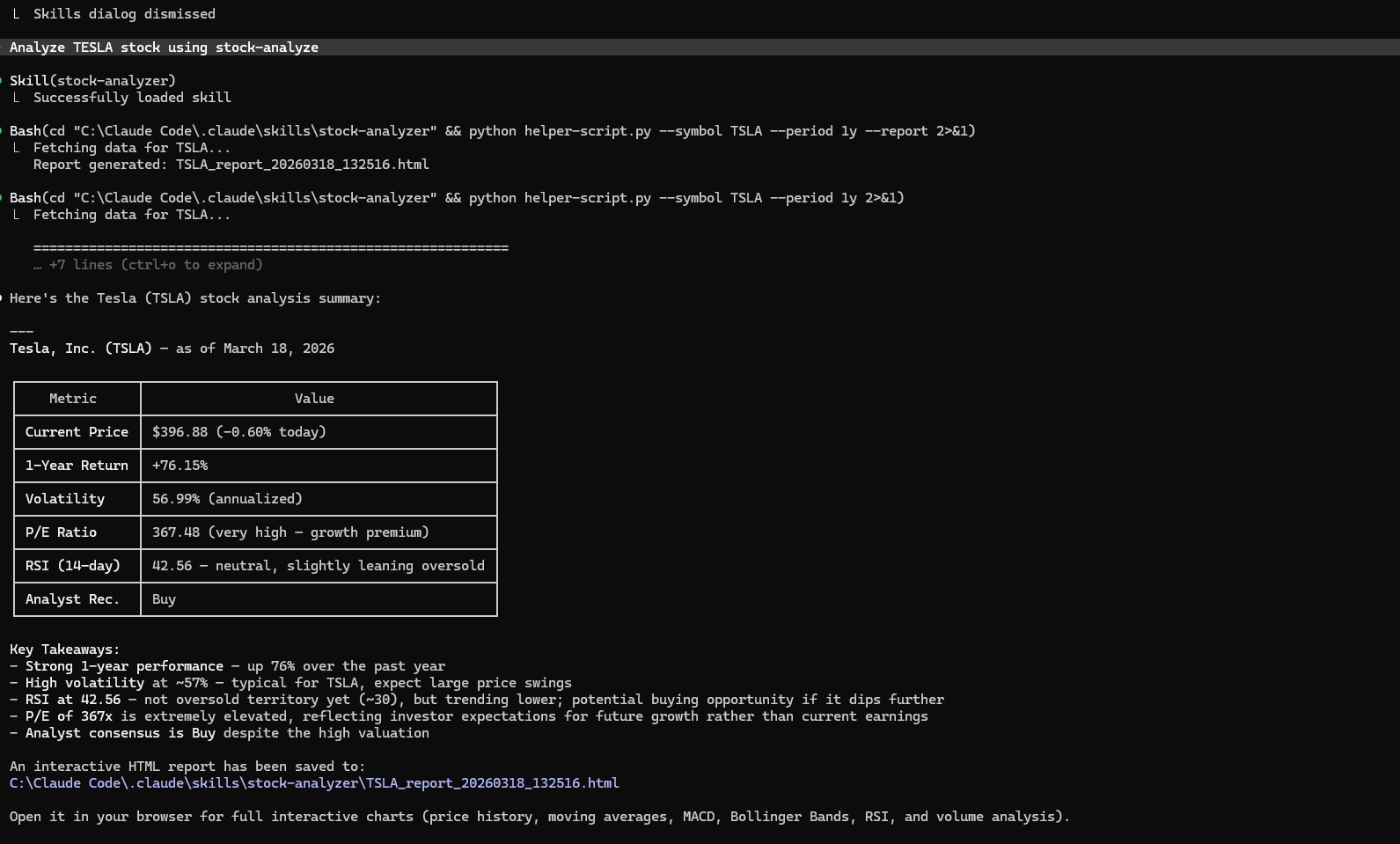
Claude Code is the CLI that runs Claude directly from your terminal with native Skills support.
📚 GitHub Repository
Step 1 — Prerequisite: Claude Code must already be running
npm install -g @anthropic-ai/claude-code
claude --version   # verify installation
Step 2 — Create the working directory structure
mkdir -p claude-workspace/.claude/skills
cd claude-workspace
Step 3 — Copy the stock-analyzer skill into the skills directory
cp -r /path/to/stock-analyzer .claude/skills/
Verify the structure looks exactly like this:
claude-workspace/
└── .claude/
    └── skills/
        └── stock-analyzer/
            ├── SKILL.md
            ├── helper-script.py
            ├── templates/
            └── resources/
💡 The
.claudefolder is Claude Code’s project config home — like.gitfor Git. Every skill package goes directly inside.claude/skills/.
Step 4 — Install Python dependencies
pip install yfinance pandas numpy plotly
8. 🚀 Run It — Analyze TESLA Stock
Open your terminal from claude-workspace/ and start Claude Code. Use /skills to verify your skill is discovered, then ask your first query.
Launch Claude Code
~/claude-workspace $ claude
✓ Claude Code started · project: claude-workspace
✓ Skills directory found: .claude/skills/
Check Available Skills
claude> /skills

📦 Available Skills — 1 found in .claude/skills/

  01  stock-analyzer   Comprehensive stock market analysis using Yahoo Finance data

Type a query to auto-trigger a skill · or use /skill <name> to invoke directly
Ask Your First Query
claude> Analyze TESLA stock using stock-analyzer

⚡ Skill matched: stock-analyzer  (triggered by: "analyze TESLA stock")
📥 Loading SKILL.md instructions...
🐍 Running: helper-script.py --symbol TSLA --period 1y --report
   Fetching data for TSLA...
   Computing RSI, MACD, Bollinger Bands, SMA 20/50/200...
   Building interactive Plotly charts...
   Rendering report from templates/report.html...

✅ Analysis Complete — TSLA (Tesla Inc.) · 1 Year
   Current Price      $248.50
   1-Year Return      +38.2%
   RSI (14)           62.4 — Neutral
   MACD Signal        Bullish crossover
   SMA 50 / 200       $231.40 / $218.60
   P/E Ratio          78.5x
   Analyst            BUY (32 analysts)
   Report saved       TSLA_report_20260318.html
Quick Reference
| Command | What it does |
|---|---|
/skills |
List all skills in .claude/skills/ |
/skill stock-analyzer |
Directly invoke the skill by name |
| Natural language query | Claude auto-matches to the right skill |
.claude/skills/ |
Drop any skill folder here to activate it |
✅ Summary
🚀 That’s it! Claude read SKILL.md, followed its instructions, ran
helper-script.py, and generated a full interactive HTML report — all from one natural-language query. This is the power of Claude Skills.
- SKILL.md is the brain — write a clear description and Claude knows exactly when to trigger
- helper-script.py is the engine — pre-tested functions, no code generation at runtime
- templates/ are the blueprints — consistent professional output every time
- resources/ are the reference — Claude looks up facts instead of guessing
.claude/skills/is where Claude Code discovers your packages
📖 Previous: Claude Skills — Introduction & Overview
🛠 Hands-On: Build a Stock Analyzer Expert with Claude Skills · aicodegeek.com