🛠️ Working with Tool Calls in Google Agent Development Kit (ADK)
The LLM behind an agent only knows what it was trained on. This post teaches a Google ADK agent to call a real tool — a live Yahoo Finance lookup — so it can answer questions it could never answer from memory alone.
In the previous post we built a simple agent using the Google Agent Development Kit (ADK). That agent could only answer from what the underlying LLM already knew. In this post, we’ll go one step further and teach our agent to call a tool — fetching live, real-world data and using it to answer a question the model could never answer from memory alone.
Table of Contents
- What Is a Tool, and How Does Tool Calling Work?
- The Use Case: A Stock Price History Agent
- Building the Agent
- Verifying the Tool Is Actually Being Called
- Summary
1. What Is a Tool, and How Does Tool Calling Work?
An LLM by itself only knows what it was trained on — it has no access to today’s stock price, the weather right now, or your company’s internal database. A tool (also called a “function”) is a regular piece of code — a Python function, an API call, a database query — that the LLM can decide to invoke when it needs information or an action it can’t produce on its own.
At a high level, tool calling works like this:
- You describe the tool to the LLM (its name, parameters, and what it does) using its docstring and type hints.
- The user sends a prompt.
- The LLM decides — on its own — whether answering requires calling a tool, and if so, with which arguments.
- The framework (ADK, in our case) executes the actual Python function.
- The tool’s return value is sent back to the LLM.
- The LLM uses that result to generate a natural-language response.
💡 Callout: ADK handles steps 3–5 automatically — all we need to do is write a normal Python function and hand it to the
Agent.
2. The Use Case: A Stock Price History Agent
We want to ask an agent for a stock’s price and its history over a given period. So we’ll build a tool, get_stock_price_history(), that internally calls a stock market data API (Yahoo Finance, via the yfinance library) and returns structured price data.
Whenever we prompt with a specific ticker and time range, the agent should be smart enough to understand the request and call our tool with the right arguments.
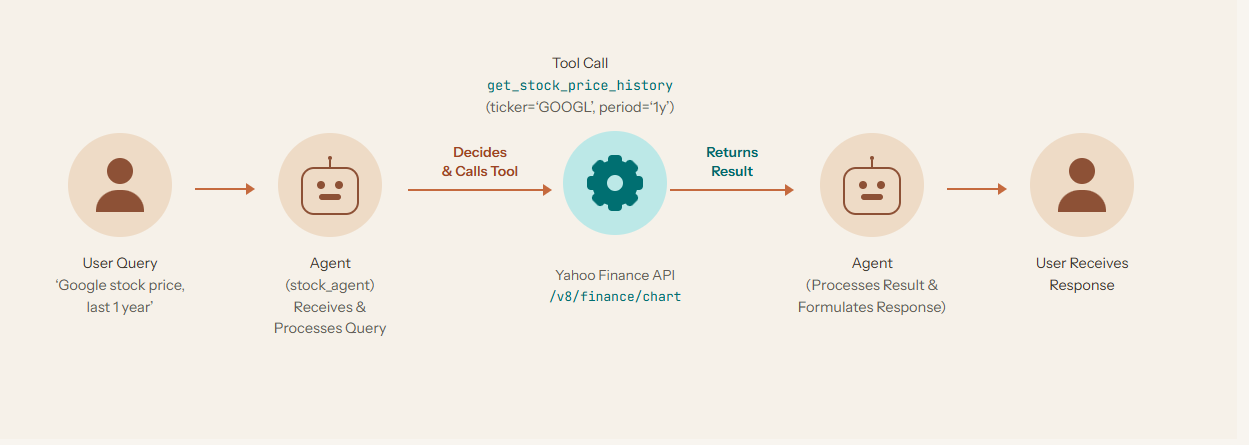
The flow: the user asks in plain English, the agent decides to call get_stock_price_history(ticker='GOOGL', period='1y'), the tool hits the Yahoo Finance API (/v8/finance/chart) and returns the data, and the agent turns that raw data into a natural-language response.
3. Building the Agent
📁 Step 1: Create the Project Folder
mkdir google-adk-workspace
cd google-adk-workspace
⚠️ Note: ADK loads agents as Python packages, and Python package names can’t contain hyphens. Once you run
adk create, use an underscore-based name (e.g.google_adk_agent_tool_call) soadk web/adk runcan discover it correctly.
🏗️ Step 2: Scaffold the Agent
adk create google_adk_agent_tool_call
This walks you through the same prompts as before — telemetry, model choice (gemini-3.5-flash), backend (Google AI), and your API key — and generates agent.py, __init__.py, .env, and .gitignore.
🛠️ Step 3: Write the Tool and Wire It into the Agent
Here’s the complete agent.py. The tool fetches OHLCV (Open/High/Low/Close/Volume) history for a given ticker and period, and returns a structured status / report (or status / error_message) dict — which is the pattern ADK tools should follow so the LLM can reliably reason about success and failure.
import yfinance as yf
from google.adk.agents import Agent


def get_stock_price_history(ticker_symbol: str, period: str = "1mo") -> dict:
    """Retrieves historical stock price data for a given ticker symbol using Yahoo Finance.

    Args:
        ticker_symbol (str): The stock ticker symbol (e.g. "AAPL", "GOOGL", "MSFT").
        period (str): The lookback period. One of: "1d", "5d", "1mo", "3mo",
            "6mo", "1y", "2y", "5y", "10y", "ytd", "max". Defaults to "1mo".

    Returns:
        dict: status and result (list of daily OHLCV records) or error msg.
    """
    valid_periods = {"1d", "5d", "1mo", "3mo", "6mo", "1y", "2y", "5y", "10y", "ytd", "max"}
    if period not in valid_periods:
        return {
            "status": "error",
            "error_message": f"Invalid period '{period}'. Must be one of {sorted(valid_periods)}.",
        }

    try:
        ticker = yf.Ticker(ticker_symbol)
        history = ticker.history(period=period)
    except Exception as e:
        return {
            "status": "error",
            "error_message": f"Failed to fetch data for '{ticker_symbol}': {e}",
        }

    if history.empty:
        return {
            "status": "error",
            "error_message": f"No historical price data found for ticker '{ticker_symbol}'.",
        }

    history = history.reset_index()
    history["Date"] = history["Date"].dt.strftime("%Y-%m-%d")
    records = history[["Date", "Open", "High", "Low", "Close", "Volume"]].round(2).to_dict(orient="records")

    return {
        "status": "success",
        "report": {
            "ticker": ticker_symbol.upper(),
            "period": period,
            "history": records,
        },
    }


root_agent = Agent(
    name="stock_price_agent",
    model="gemini-3.5-flash",
    description="Agent to answer questions about historical stock prices.",
    instruction=(
        "You are a helpful agent who can answer user questions about a stock's "
        "historical price using the get_stock_price_history tool. When the user "
        "does not specify a time period, default to the last month ('1mo')."
    ),
    tools=[get_stock_price_history],
)
A few things worth calling out:
- The docstring is the contract. ADK reads the function’s docstring, parameter names, types, and defaults to build the tool schema the LLM sees. A clear docstring is what lets the model figure out it should pass
period="1y"when the user says “last one year.” - Never let the tool raise. Wrap the risky call in
try/exceptand return astatus: errordict instead — this lets the agent explain the problem to the user in natural language rather than crashing. - Registering the tool is one line:
tools=[get_stock_price_history].
📦 Step 4: Add Dependencies
google-adk
yfinance
pip install -r requirements.txt
💻 Step 5: Run the Agent from the CLI
adk run google_adk_agent_tool_call
Running agent stock_price_agent, type exit to exit.
[user]: Find googl 1 week price history
[stock_price_agent]: Here is the 1-week (5-day) price history for Alphabet Inc. (GOOGL):

*   **August 17, 2026:** Open: $346.27 | Close: $344.00 (High: $347.25, Low: $341.93)
*   **August 18, 2026:** Open: $342.41 | Close: $344.20 (High: $344.87, Low: $340.19)
*   **August 19, 2026:** Open: $342.46 | Close: $344.72 (High: $346.73, Low: $340.66)
*   **August 20, 2026:** Open: $343.06 | Close: $340.67 (High: $343.90, Low: $338.57)
*   **August 21, 2026:** Open: $342.58 | Close: $344.82 (High: $346.20, Low: $340.40)
[user]: exit
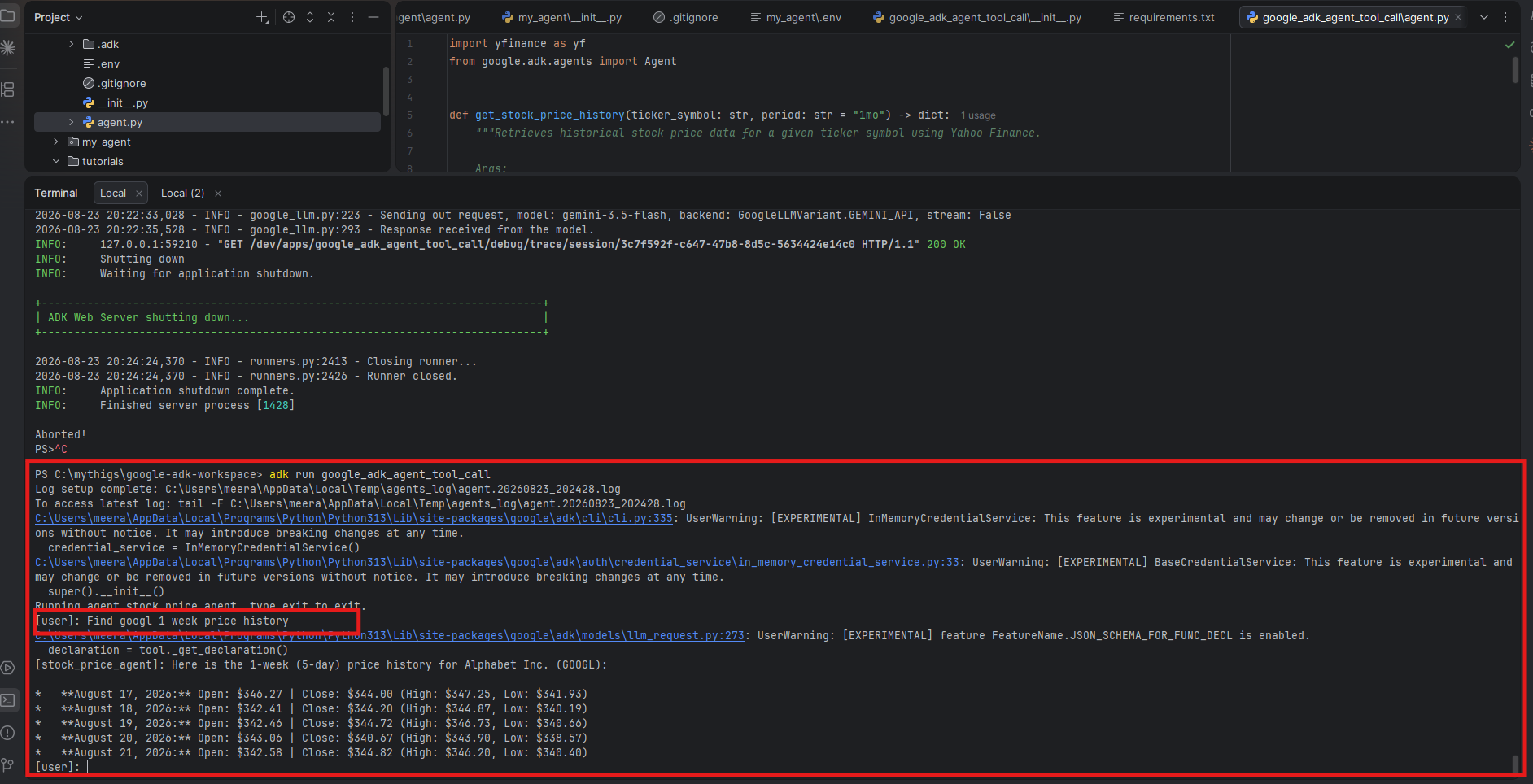
Notice we never typed a ticker symbol or a period in a form the tool expects — we just asked naturally, and the LLM mapped “googl” → GOOGL and “1 week” → period="5d" on its own before invoking the tool.
🌐 Step 6: Run the Agent with the Web UI
adk web --port 8000
Open http://127.0.0.1:8000, pick google_adk_agent_tool_call from the app list, and ask the same question. The Web UI’s Events panel is the best way to see tool calling happen step by step:
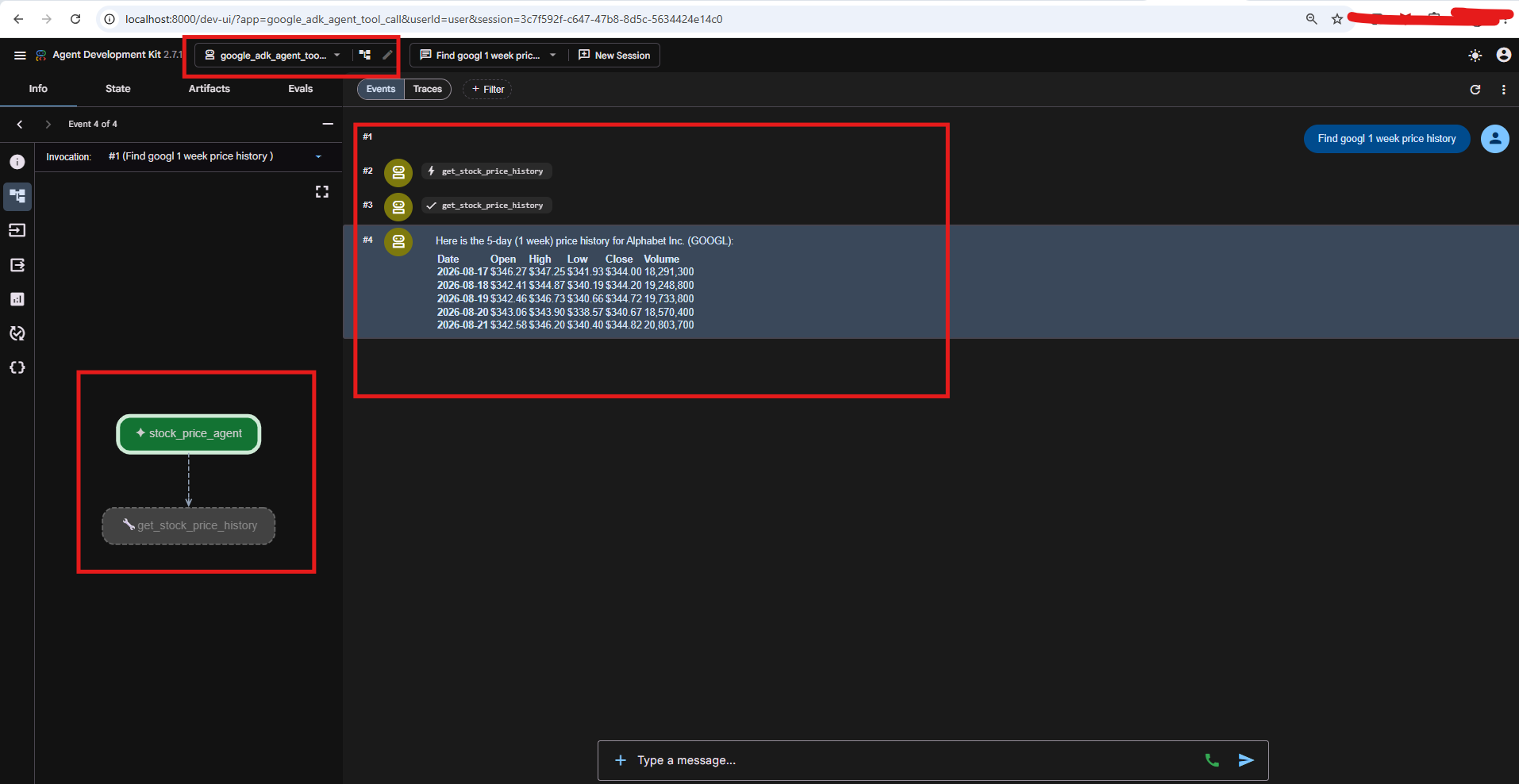
Reading the event list from top to bottom: #1 is the user message; #2 is a function_call event where the agent invokes get_stock_price_history with the arguments it inferred; #3 is a function_response event carrying the tool’s return value; #4 is the agent’s final natural-language answer, built from the tool’s data. The graph view on the left (stock_price_agent → get_stock_price_history) confirms the same thing visually: this response was not guessed by the model, it was grounded in a real tool call.
4. Verifying the Tool Is Actually Being Called
A few practical ways to double check this, beyond the Events panel:
- Add a log line inside the tool — e.g.
print(f"[TOOL CALLED] {ticker_symbol=} {period=}")— and watch your terminal while chatting in the web UI. - Ask for something the model can’t know from training data — a specific recent closing price. If the answer is accurate and current, it had to come from the tool.
- Inspect events programmatically with
InMemoryRunner, checking each event forfunction_call/function_response:
async for event in runner.run_async(user_id="u1", session_id=session.id, new_message=content):
    for p in event.content.parts:
        if p.function_call:
            print("CALLED:", p.function_call.name, p.function_call.args)
        if p.function_response:
            print("RESULT:", p.function_response.response)
5. Summary
We extended our first ADK agent with a real tool: get_stock_price_history, backed by the Yahoo Finance API through yfinance. The agent parses natural language (“last one year”, “1 week”), maps it to the correct tool arguments, executes the tool, and turns the structured result into a readable answer — all without us writing any parsing or routing logic ourselves. That’s the core value of tool calling in ADK: you write plain Python functions with good docstrings, and the LLM handles the “when” and “how” of calling them.
In the next post, we’ll look at agents that use multiple tools together and how ADK decides which one to call when there’s more than one option.