
🛠️ Your Team's Own SWE Agent — Stop Prompting, Start Provisioning
Coding agents are already fast. What slows teams down is re-explaining **how your company builds software** in every session. Capture that knowledge once, package it as a **house SWE agent plugin**, and give it to everyone.
| Quick Facts | |
|---|---|
| The core shift | Prompting → Provisioning |
| Packaged as | One versioned Claude Code plugin |
| Owned by | The platform team, maintained like code |
💡 About the example: throughout this post I use AicodeGeek as a demo company to show the pattern end to end. The
aicodegeek-*libraries (aicodegeek-http,aicodegeek-authz,aicodegeek-log…), theaicodegeek-swe-agentplugin and theaicodegeek/claude-pluginsmarketplace are illustrations, not real packages you can install. Swap in your own platform, libraries and policies.
Table of Contents
- The Hidden Tax: Re-explaining Your Company to the Agent
- The Core Idea: A House SWE Agent, Built Once, Used by Everyone
- Step 1: Figure Out What Makes Your Team Different
- Reference Architecture
- Step 2: Package It as a Claude Code Plugin
- A Day in the Life: Before and After
- Step 3: Roll It Out
- Measuring the Gain, and an Honest Word About “10x”
- Conclusion: Stop Prompting, Start Provisioning
1. The Hidden Tax: Re-explaining Your Company to the Agent
Coding agents like Claude Code are already fast. What slows teams down is not the agent’s typing speed. It is the minutes every developer spends, every session, telling a generic agent how their company builds software.
Watch a typical session. Before any real work happens, the developer types something like:
- “Use our
aicodegeek-httpclient, not axios.” - “Auth goes through the platform gateway, don’t roll your own JWT check.”
- “Logs must use the structured logger with the trace ID.”
- “New services start from the golden-path template in
platform-templates.” - “Don’t forget the PR needs a ticket ID and the security checklist.”
Now multiply that by every developer, every day, across the organization. Each person re-discovers the same conventions, writes slightly different prompts, and gets slightly different results. The agent is generic; your platform is not. The gap between the two is paid in human attention, the scarcest resource on any team.
💡 The fix is simple to state: capture that knowledge once, package it as a specialized software engineering agent, and give it to everyone.
2. The Core Idea: A House SWE Agent, Built Once, Used by Everyone
Think of it as hiring one senior engineer who has read every runbook, every internal library’s README and every security policy, then cloning them onto every developer’s laptop.
The shift is from prompting to provisioning:
| Generic agent | House SWE agent | |
|---|---|---|
| Platform knowledge | Re-explained in each prompt | Loaded automatically at session start |
| Internal libraries | Agent guesses or picks public packages | Agent knows aicodegeek-* modules and when to use each |
| Security and compliance | Remembered by the human, sometimes | Enforced by hooks and checked before commit |
| New service or API | Developer describes the template | One command scaffolds from the golden path |
| Consistency across the team | Varies by who wrote the prompt | Same standards for every developer |
| Who maintains it | Nobody; it lives in people’s heads | The platform team, versioned like code |
The developer’s job moves up a level. Instead of steering the agent through how the company works, they spend their prompts on what the feature should do.
Two groups make this work together:
- Platform team — builds and maintains the agent as a product.
- Individual developers — use it daily and feed back what it gets wrong.
3. Step 1: Figure Out What Makes Your Team Different
Before writing a single config file, run a discovery exercise. The goal is to write down everything a senior engineer would tell a new hire in their first two weeks. Each answer becomes a piece of the agent.
| Area | Questions to answer | Becomes in the agent |
|---|---|---|
| Platform | Which cloud, runtime, deploy target (Kubernetes, serverless)? Which CI/CD? Which golden-path templates exist? | CLAUDE.md platform section + scaffolding skill |
| Home-grown libraries | Which internal packages must be used (HTTP client, config, feature flags, data access)? Which public libraries are banned? | Library catalog skill + lint hook |
| Cross-cutting concerns | How do we do authentication and authorization, observability (logs, metrics, traces), error handling, secrets? | One skill per concern, with code snippets |
| Security and compliance | Which standards apply (SOC 2, PCI, HIPAA, GDPR)? PII rules? Dependency and license policy? | Security reviewer subagent + pre-commit hooks |
| Repo and workflow rules | Branch naming, commit message format, PR template, ticket linking, required reviewers? | Git workflow skill + commit hook |
| Definition of done | Minimum test coverage, required docs, ADRs, API spec updates, changelog? | Checklist the agent runs before declaring done |
| Internal systems | Service catalog, API registry, ticket tracker, internal docs? | MCP servers the agent can query |
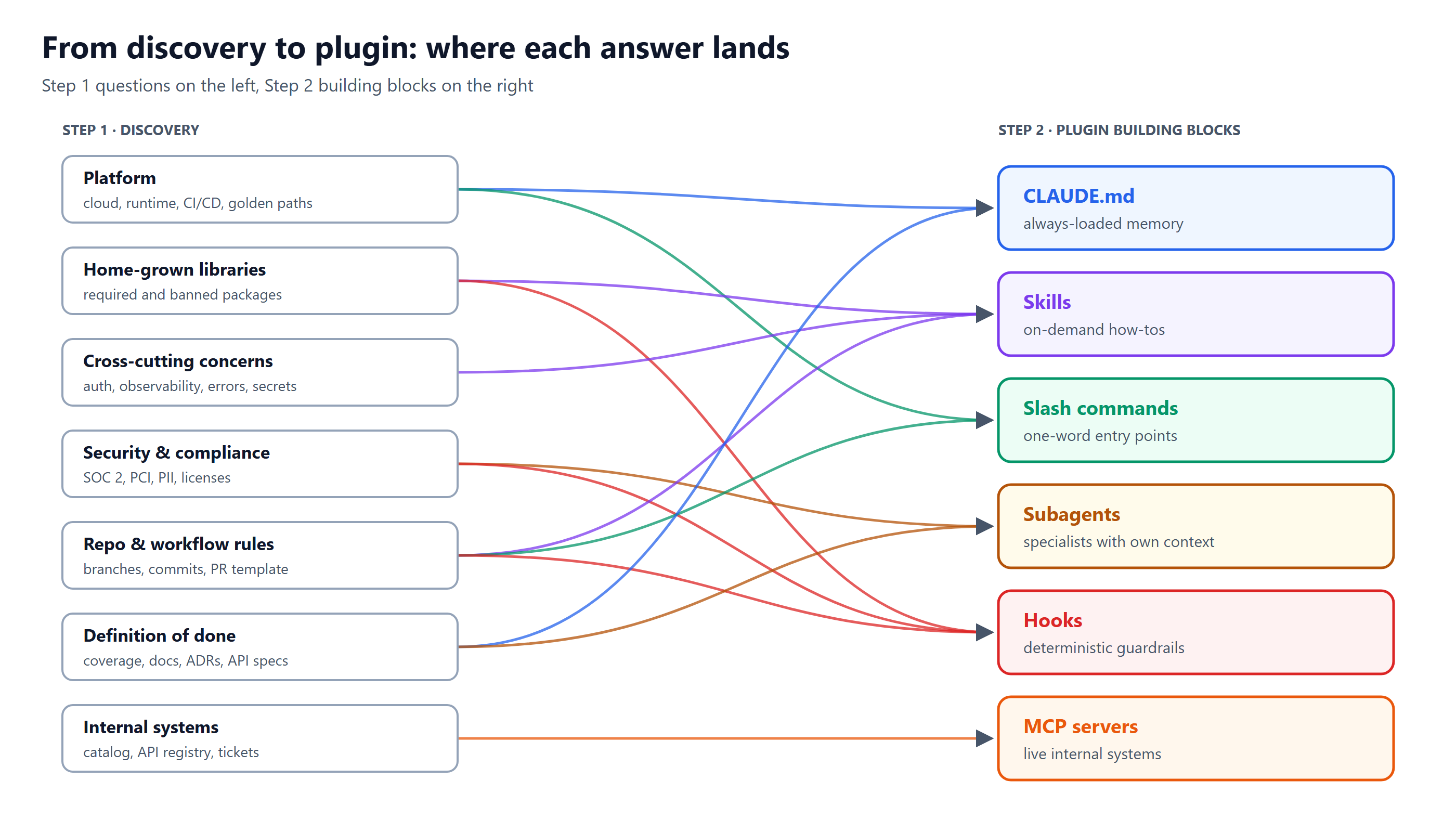
Every discovery answer has a home in the plugin. Most areas land in more than one place — security, for example, becomes both a reviewer subagent (judgment) and hooks (hard rules).
💡 Tip: don’t invent this from scratch. Mine it from what already exists: onboarding docs, PR review comments (the same review comments repeated 50 times are your best source), incident postmortems, and the platform team’s support channel. Ask Claude Code itself to read your repos and draft the first version, then have senior engineers correct it.
4. Reference Architecture
The house agent has four layers: knowledge captured once, a plugin that packages it, every developer’s Claude Code session, and the normal delivery pipeline. The dashed loop is what keeps it alive.
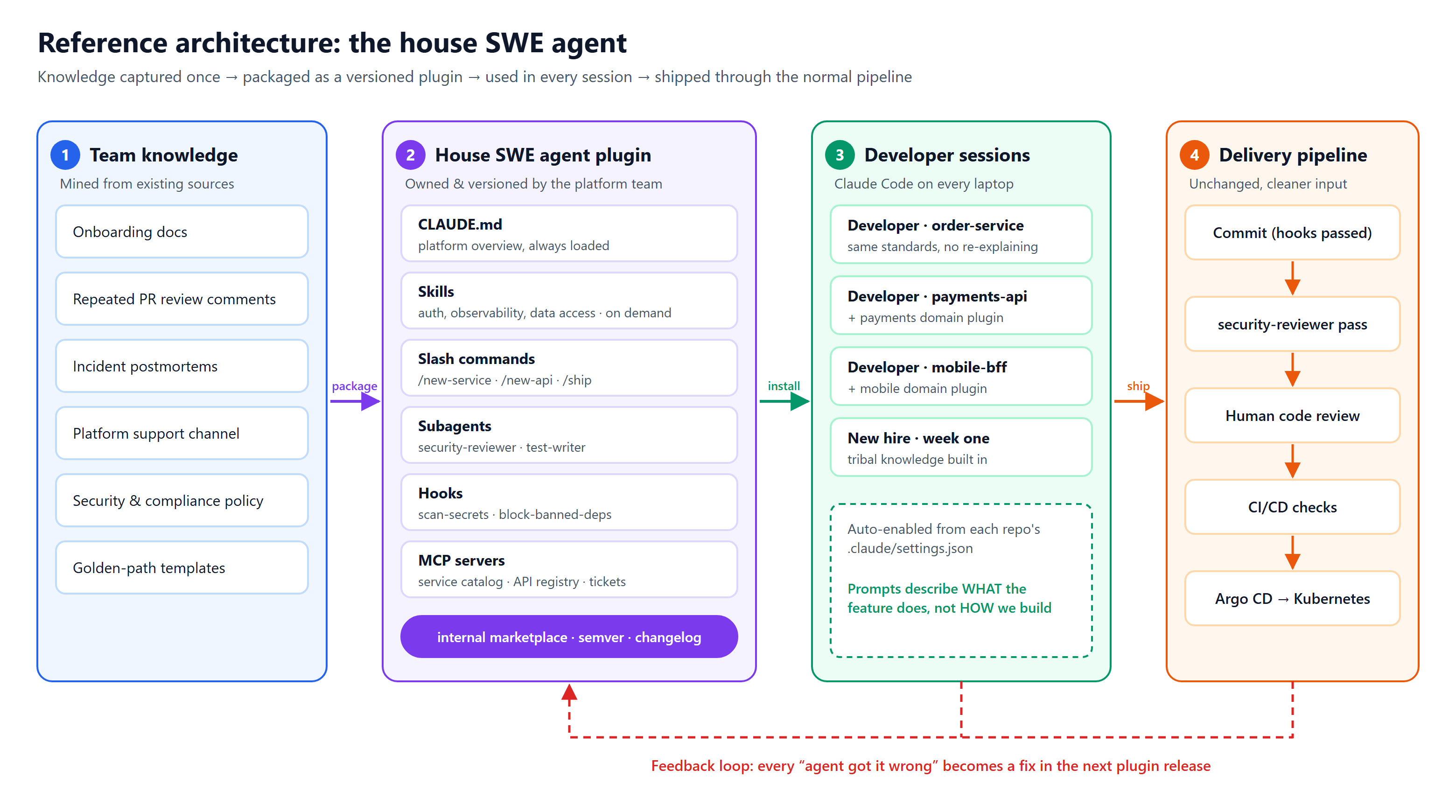
Left to right: knowledge is packaged into the plugin, the plugin is installed into every session, and work ships through the pipeline you already have. The red loop is how corrections from real use flow back into the next plugin release.
The platform team owns the middle layer. Developers never edit it directly; they report what the agent got wrong, and those corrections ship in the next release.
5. Step 2: Package It as a Claude Code Plugin
Claude Code plugins bundle everything the agent needs into one installable, versioned unit. Each discovery answer maps to a plugin building block:
CLAUDE.md(memory): always-loaded context. Keep it short: the platform in a nutshell and pointers to skills.- Skills: focused instructions plus examples, loaded only when relevant (“create a new REST endpoint”, “add tracing”).
- Slash commands: one-word entry points for frequent jobs, like
/new-serviceor/ship. - Subagents: specialists with their own context, such as a security reviewer or a test writer.
- Hooks: deterministic guardrails that run on every edit or commit. Prompts are advice; hooks are law.
- MCP servers: live connections to internal systems (service catalog, API registry, tickets, docs).
📁 Repository Layout
aicodegeek-swe-agent/
├── .claude-plugin/
│   └── plugin.json            # name, version, description
├── CLAUDE.md                  # platform overview, always loaded
├── commands/
│   ├── new-service.md         # /new-service  -> golden-path scaffold
│   ├── new-api.md             # /new-api      -> endpoint + OpenAPI + tests
│   └── ship.md                # /ship         -> checks, commit, PR
├── skills/
│   ├── internal-libraries/SKILL.md
│   ├── auth-and-authz/SKILL.md
│   ├── observability/SKILL.md
│   ├── data-access/SKILL.md
│   └── git-workflow/SKILL.md
├── agents/
│   ├── security-reviewer.md
│   └── test-writer.md
├── hooks/
│   ├── hooks.json
│   └── scripts/
│       ├── block-banned-deps.sh
│       └── scan-secrets.sh
└── .mcp.json                  # service catalog, API registry, tickets
🧠 Sample: CLAUDE.md
# AicodeGeek engineering platform

You are a software engineer at AicodeGeek. Follow these rules in every task.

## Platform
- Services: Kotlin (Spring Boot) or TypeScript (Node 22), deployed to Kubernetes via Argo CD.
- New services MUST start from the golden path: run /new-service.
- Config comes from `aicodegeek-config`; never read env vars directly.

## Always
- HTTP calls: `aicodegeek-http` (retries, tracing, auth headers built in).
- Logging: `aicodegeek-log` structured logger; include trace_id; never log PII.
- AuthN/AuthZ: requests are authenticated at the gateway; use `aicodegeek-authz`
  for permission checks. Never parse JWTs yourself.

## Before you say "done"
- Unit tests pass, coverage >= 90% on changed files.
- OpenAPI spec updated for any API change.
- Run the security-reviewer subagent on the diff.

Detailed how-tos live in the plugin skills; load them when relevant.
📚 Sample: A Skill (skills/observability/SKILL.md)
---
name: observability
description: Use when adding logging, metrics, tracing or alerts to any AicodeGeek service.
---

# Observability at AicodeGeek

1. Logger: `val log = AicodeGeekLog.forClass(this::class)`; levels INFO for business
   events, WARN for recoverable errors, ERROR pages on-call.
2. Metrics: use `AicodeGeekMetrics.counter("orders_created_total")`. Name with
   `<noun>_<verb>_total`. Every new endpoint gets a latency histogram.
3. Tracing: `aicodegeek-http` and `aicodegeek-db` propagate spans automatically.
   Wrap custom async work in `Tracing.span("name") { ... }`.
4. Alerts: add an SLO entry in `slo.yaml`; do not hand-write alert rules.

See examples/order-service for a complete reference.
🔐 Sample: A Subagent (agents/security-reviewer.md)
---
name: security-reviewer
description: Reviews a diff against AicodeGeek security and compliance policy. Use before every PR.
tools: Read, Grep, Glob, Bash
---

You are AicodeGeek's application security reviewer. Check the current diff for:
- Secrets, tokens or keys in code or config
- PII written to logs, analytics or error messages
- Missing `aicodegeek-authz` permission checks on new endpoints
- New dependencies not on the approved list (see internal-libraries skill)
- SQL built by string concatenation

Report findings as BLOCKER / SHOULD-FIX / NIT with file:line.
Do not edit files; only report.
🚧 Sample: Hooks (hooks/hooks.json)
{
  "hooks": {
    "PreToolUse": [
      {
        "matcher": "Edit|Write",
        "hooks": [{ "type": "command",
                     "command": "${CLAUDE_PLUGIN_ROOT}/hooks/scripts/scan-secrets.sh" }]
      }
    ],
    "PostToolUse": [
      {
        "matcher": "Edit|Write",
        "hooks": [{ "type": "command",
                     "command": "${CLAUDE_PLUGIN_ROOT}/hooks/scripts/block-banned-deps.sh" }]
      }
    ]
  }
}
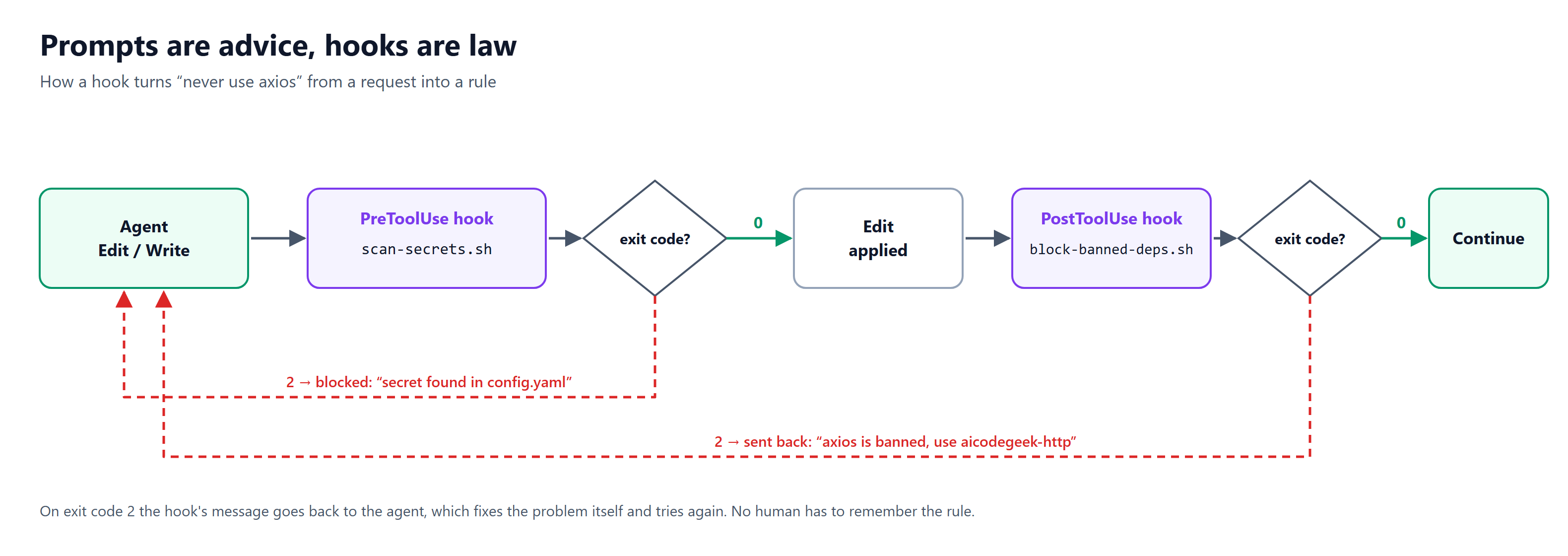
Exit code 0 lets the agent carry on. Exit code 2 sends the hook’s message straight back to the agent, which fixes the problem and tries again — no human in the loop has to remember the rule.
A hook script that exits with code 2 blocks the action and sends its message back to the agent, which then fixes the problem itself. That is how “never use axios” stops being a request and becomes a rule.
📦 Distributing It to the Whole Team
Publish the plugin from an internal Git repo set up as a plugin marketplace. Developers install it once (the names below are from the AicodeGeek example; replace them with your own marketplace repo and plugin name):
/plugin marketplace add aicodegeek/claude-plugins
/plugin install aicodegeek-swe-agent@aicodegeek
Even better, commit the marketplace and enabled plugin to each repo’s .claude/settings.json, so anyone who opens the repo in Claude Code gets the house agent automatically.
💡 Note: check the current Claude Code plugin docs for exact file formats, as they evolve.
6. A Day in the Life: Before and After
Take a common ticket: “add a GET /orders/{id}/invoice endpoint to the order service.” The work is the same; what disappears is the steering.
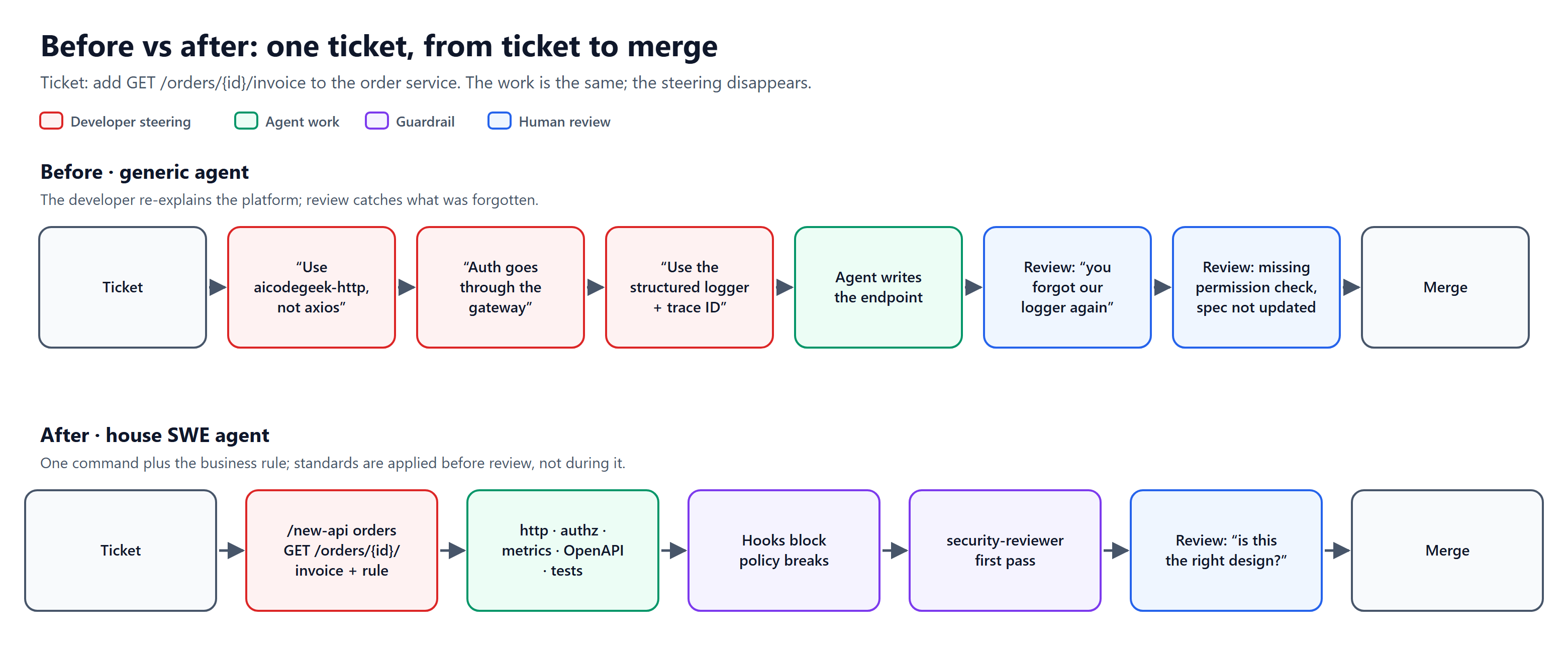
Red is developer steering, green is agent work, purple is guardrails, blue is human review. The house agent removes the red boxes up front and turns review rounds about conventions into a single review about design.
With the house agent, the developer types /new-api orders GET /orders/{id}/invoice plus a sentence about the business rule. The agent already knows to use aicodegeek-http, add an aicodegeek-authz permission check, emit the latency metric, update the OpenAPI spec and write tests. The hooks block anything that breaks policy, and the security subagent reviews the diff before a human ever sees it.
💡 The real win: code review shifts from “you forgot our logger again” to “is this the right design?”
7. Step 3: Roll It Out
Treat the house agent as an internal product with users, releases and a roadmap.
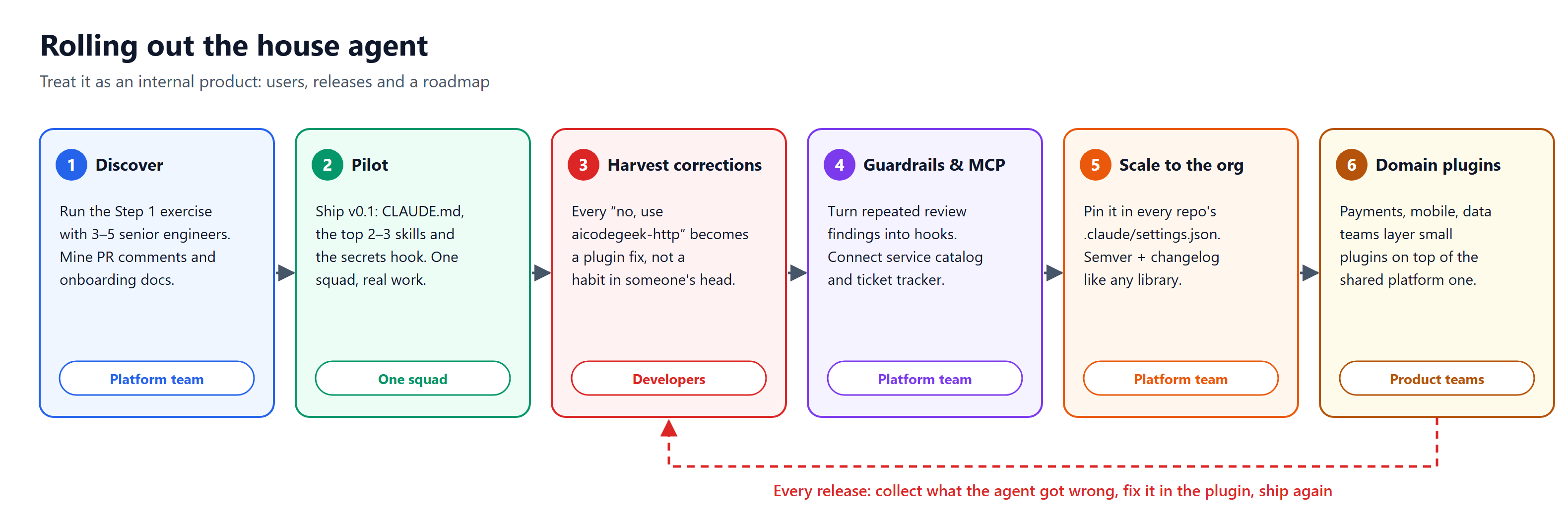
Six stages, each with a clear owner. The loop back to “harvest corrections” is not a one-off step — it repeats with every plugin release.
A practical sequence:
- Discover (platform team). Run the Step 1 exercise with 3 to 5 senior engineers. Mine PR comments and onboarding docs.
- Pilot (one squad). Ship a v0.1 with
CLAUDE.md, the two or three most-used skills and the secrets hook. Have the squad use it for real work. - Harvest corrections. Every time a developer has to correct the agent (“no, use
aicodegeek-http”), that correction becomes a fix in the plugin, not a habit in someone’s head. Add a feedback channel and a simple “agent got it wrong” template. - Add guardrails and integrations. Convert repeated review findings into hooks. Connect MCP servers for the service catalog and ticket tracker.
- Scale to the org. Pin the plugin in every repo’s
.claude/settings.json. Version it with semantic versioning and a changelog like any library. - Specialize per domain. Let product teams layer their own small plugins (payments, mobile, data) on top of the shared platform plugin.
🙋 What Individual Developers Can Do Today
You don’t need to wait for the platform team. Start personal and promote what works:
- Project memory — write a project
CLAUDE.mdfor the repos you touch most. - Three-strikes rule — turn any prompt you have typed three times into a slash command.
- Repeat mistakes — when the agent makes the same mistake twice, write it down as a rule in
CLAUDE.md. - Share upward — share your commands and skills with your team; the good ones graduate into the shared plugin.
8. Measuring the Gain, and an Honest Word About “10x”
“10x” is a direction, not a promise. The biggest gains show up on work that is repetitive and convention-heavy: new services, new endpoints, migrations, test coverage, and onboarding. Novel design work and hard debugging still lean on human judgment. Measure, don’t assume.
| Metric | What it tells you |
|---|---|
| Time from ticket to merged PR | End-to-end speed, the number leadership cares about |
| Steering prompts per task | How often developers must correct the agent; should fall with each plugin release |
| PR review rounds and repeated review comments | Whether standards are now applied before review, not during it |
| Time to first merged PR for new hires | How much tribal knowledge the agent now carries |
| Security findings caught pre-commit vs in review | Whether guardrails shift problems left |
| Developer satisfaction (short survey) | Whether people actually prefer working this way |
Take a baseline for a few weeks before the pilot, then compare the pilot squad against a similar squad without the plugin.
⚠️ Pitfalls to Avoid
- A giant
CLAUDE.md. Everything always loaded crowds the context. Keep memory short and push detail into skills that load on demand. - Stale knowledge. A plugin that recommends last year’s library is worse than none. Give it an owner and review it with every platform release.
- Rules only in prompts. Anything that must never happen (secrets, banned dependencies) belongs in a hook, not a sentence.
- Skipping human review. The agent writes faster; people still own what ships. Keep code review, and use the security subagent as a first pass, not a replacement.
- Building it in isolation. If developers don’t feed back corrections, the agent stops improving. Make reporting a miss take ten seconds.
9. Conclusion: Stop Prompting, Start Provisioning
Every team already has a “way we build things.” Today it lives in senior engineers’ heads and gets re-typed into chat windows thousands of times a week. Turning it into a shared, versioned SWE agent means developers spend their attention on the problem, not on the platform.
✅ Starter Checklist
- List your platform, golden paths and internal libraries
- Write down auth, observability, security and compliance rules
- Capture repo rules and your definition of done
- Draft
CLAUDE.mdand the three most-used skills - Add hooks for secrets and banned dependencies
- Pilot with one squad and collect corrections
- Publish the plugin to an internal marketplace and pin it in every repo
- Track steering prompts and ticket-to-merge time each release
Built around Claude Code plugins: CLAUDE.md, skills, slash commands, subagents, hooks and MCP servers. Swap in your own platform, libraries and policies; the pattern stays the same.